Auto Trading Bots
Sniper Bot V2 Deriv Bots Guide: 11 Strategies Setup
Follow this sniper bot v2 deriv bots guide to configure eleven distinct strategies on BinaryBot.live. Start your automated trading bot setup today.
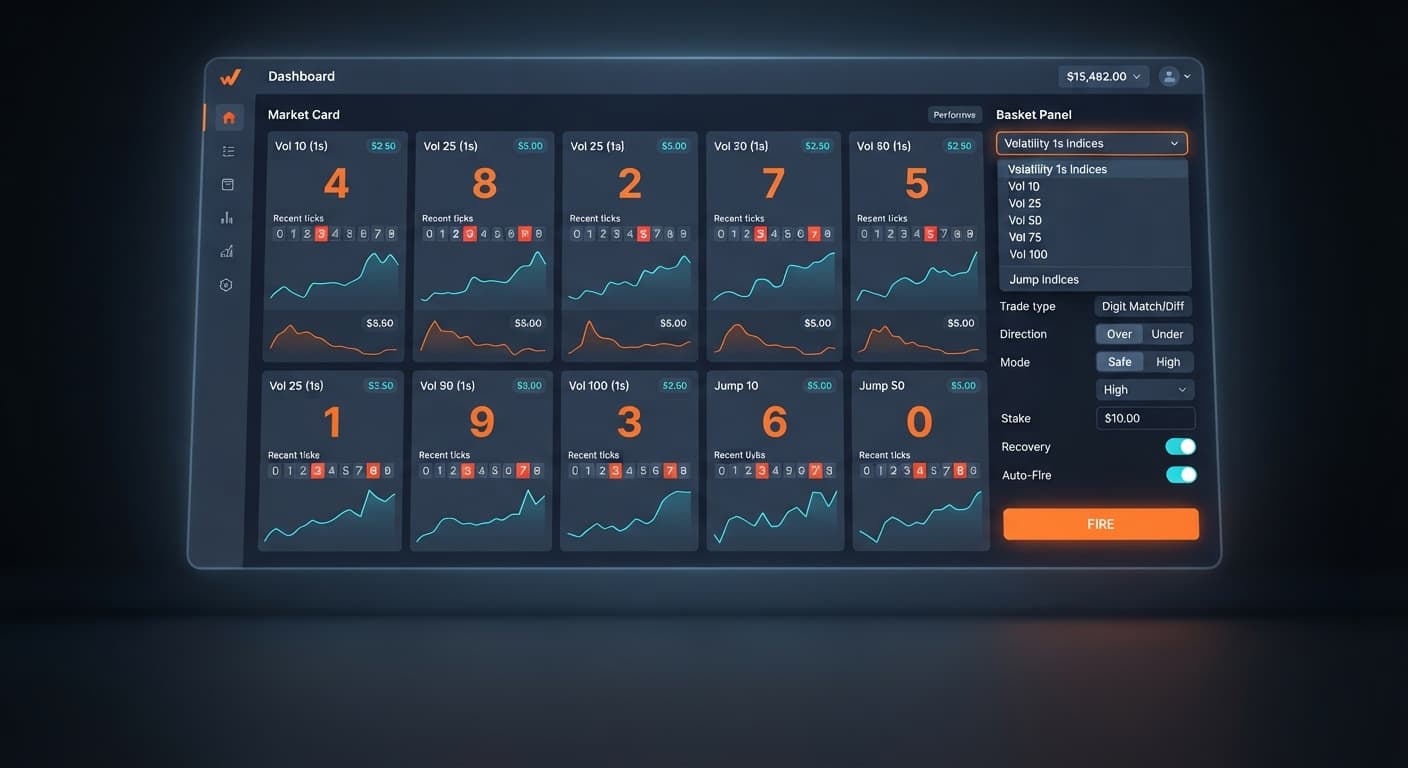
If you want the absolute multi shot best market combination, selecting all eight Volatility 1s indices while disabling Jump 10 and Jump 50 gives you the cleanest tick distribution for Digits Safe modes. If you run Rise / Fall contracts instead, choosing all ten available assets—including the Jump series—gives you maximum diversification across a single firing event. Multi Shot doesn't alter individual contract odds, so your market selection relies on balancing tick execution speed against your trade mode's payout ratio.
Multi Shot lets you buy contracts across up to ten markets simultaneously. You can select Vol 10 (1s), Vol 15 (1s), Vol 25 (1s), Vol 30 (1s), Vol 50 (1s), Vol 75 (1s), Vol 90 (1s), Vol 100 (1s), Jump 10, and Jump 50. In fact, Multi Shot is the only tool on the platform that trades Vol 15 (1s), Vol 30 (1s), and Vol 90 (1s).
When you set up automated execution on deriv bots, choosing your asset list dictates how your session balance reacts to drawdowns.
+-----------------------------------------------------------------------+
|                         MULTI SHOT SELECTION                          |
+-----------------------------------------------------------------------+
|  [x] Vol 10 (1s)   [x] Vol 15 (1s)   [x] Vol 25 (1s)   [x] Vol 30 (1s)  |
|  [x] Vol 50 (1s)   [x] Vol 75 (1s)   [x] Vol 90 (1s)   [x] Vol 100 (1s) |
|  [ ] Jump 10       [ ] Jump 50                                        |
+-----------------------------------------------------------------------+
Every selected market keeps a live price proposal open. When you press Fire / Start new cycle, the bot places trades against quotes Deriv has already issued. If a quote gets rejected on a volatile spike, Multi Shot flags that specific asset before spending your capital.
If you run Digits with Mode set to Safe (Over 0 or Under 9), stick strictly to the eight Volatility 1s indices. These indices process a fresh tick every single second without synthetic gap jumps. Jump 10 and Jump 50 occasionally experience sudden price jumps that can feel erratic during quick automated sequences.
For Rise / Fall trading, using all ten markets works better. Because Rise / Fall relies on market direction rather than last-digit values, the structural price jumps in Jump 10 and Jump 50 don't penalize your entry.
| Market Group | Included Assets | Best Trade Type | Key Execution Behavior |
|---|---|---|---|
| Volatility 1s (Standard) | Vol 10 (1s), Vol 25 (1s), Vol 50 (1s), Vol 75 (1s), Vol 100 (1s) | Digits (Safe/High/Max) & Rise / Fall | Uniform 1-second tick updates, highly predictable execution flow. |
| Volatility 1s (Exclusive) | Vol 15 (1s), Vol 30 (1s), Vol 90 (1s) | Digits & Rise / Fall | Available only in Multi Shot; fills out basket coverage evenly. |
| Jump Series | Jump 10, Jump 50 | Rise / Fall | Features periodic price jumps; avoid if targeting smooth digit variance. |
Your choice of markets directly scales your total layout. Set your Stake per trade (USD) carefully. If you set it to $2 across ten markets, your Basket cost reads $20 per launch. Below $2 per trade, Deriv's rounding rules slightly increase the effective cost relative to your payout, so keeping your trade size at or above $2 maximizes capital efficiency.
No market selection changes the underlying contract odds. Understanding the exact break-even requirements keeps you from burning through capital.
When trading Digits in Safe mode (Over 0 or Under 9), you win on 9 out of 10 possible last digits. That is a theoretical hit rate of 90%. Deriv pays roughly a 10% return on these contracts.
Here is the break-even math for a standard $2 Digits Safe trade:
$$\text{Break-even Win Rate} = \frac{\text{Stake}}{\text{Stake} + \text{Payout}} = \frac{$2.00}{$2.00 + $0.20} = 90.91%$$
Because the payout is $0.20 on a $2.00 stake, you need a win rate above 90.91% just to stay afloat without recovery mechanics.
Now look at Rise / Fall contracts. A standard single-tick Rise / Fall contract pays roughly 95% ($1.90 profit on a $2.00 stake). However, if the price tick stays identical, both Rise and Fall contracts lose. This drops your real win rate slightly below 50%.
$$\text{Rise / Fall Break-even Rate} = \frac{$2.00}{$2.00 + $1.90} = 51.28%$$
DIGITS SAFE (90% Win Chance)      RISE / FALL (~49.5% Win Chance)
Stake:  $2.00                     Stake:  $2.00
Payout: $0.20 (10%)               Payout: $1.90 (95%)
Break-even: 90.91%                Break-even: 51.28%
Recovery cycles amplify these numbers dramatically. Recovery is toggled on by default in Multi Shot. When a market loses inside a basket, the bot locks out the winning cards (marking them as Won) and re-stakes only the losing markets on the next round.
In Rise / Fall mode, a recovery stake roughly doubles after a loss. But on Digits Safe (Under 9 or Over 0), a single loss pushes the recovery stake to roughly 17x the base amount to cover the small payout percentage. A second consecutive loss scales that stake to roughly 300x.
If your base stake is $2:
If a calculated recovery stake exceeds your available account balance, Multi Shot stops expanding that trade. The card accepts the loss and resets to your base stake. Finding your multi shot best market configuration won't protect you from these steep progressions if a long losing streak hits, which is why testing your setup on a demo account is essential.
Deriv synthetic indices operate on cryptographic random number generators. Every tick generated on Vol 10 (1s) or Jump 50 is an independent random draw.
Traders using binary bots often fall into the trap of looking for digit trends. Past digit outputs have zero influence on future ticks. If the digit 9 appears three times in a row on Vol 75 (1s), the chance of the next digit being 9 remains exactly 1 in 10 (10%).
Jump indices differ from standard Volatility indices solely in price movement physics. Jump 10 and Jump 50 simulate market shocks by making uniform price jumps on average every 20 minutes or 10 minutes. However, the last digit of the price float is drawn independently of those price shocks.
Multi Shot's Auto-Fire feature takes advantage of live tick tracking. When enabled, Auto-Fire monitors the last digit of all selected markets. It fires a basket automatically when two or more markets sit in their losing zone (highlighted in red on the market cards).
[Vol 10 (1s): Digit 9 (RED)] --> Triggers Auto-Fire
[Vol 75 (1s): Digit 9 (RED)] --> Basket Launches Immediately
It is vital to understand what this trigger actually does:
After a losing basket in Safe mode, Auto-Fire automatically flips the trade direction—switching from Over 0 to Under 9, or vice versa—while keeping you in Safe mode. On Rise / Fall, Auto-Fire simply launches the next basket as soon as contract quotes are ready.
Multi Shot displays no digit frequency panels, hot/cold heatmaps, or historical digit tables. It looks strictly at the immediate active tick to execute your rule set.
Setting up your session correctly prevents unexpected account drawdown. Follow these exact steps to launch your market basket using the correct controls on screen.
Go to Markets at the top of the Multi Shot dashboard. Click None to clear the selection, then manually check the eight Volatility 1s assets: Vol 10 (1s), Vol 15 (1s), Vol 25 (1s), Vol 30 (1s), Vol 50 (1s), Vol 75 (1s), Vol 90 (1s), and Vol 100 (1s). Leave Jump 10 and Jump 50 unchecked if you plan to trade Digits.
Select your Trade type. Choose Digits for high-probability, low-payout trades, or Rise / Fall for equal payout distribution. If you selected Digits, pick your Direction (Over or Under) and set Mode to Safe.
Enter your Stake per trade (USD). Set this to at least 2 to ensure you don't lose money to cent-rounding calculations. Look at the Basket cost readout to confirm your total entry price ($16 for eight selected markets at $2 each). Check Each win pays to see your single-trade profit.
Set clear numeric boundaries in Take profit and Stop loss before toggling any execution switches. For a $16 basket cost on Digits Safe, a $5 Take profit and a $40 Stop loss give your bot clear exit boundaries. You can also set Max baskets to limit how many consecutive automated launches can occur.
+-----------------------------------------------------------------------+
|                         RISK CONTROL PANEL                            |
+-----------------------------------------------------------------------+
|  Take profit: [ $5.00  ]   Stop loss: [ $40.00 ]   Max baskets: [ 5 ] |
+-----------------------------------------------------------------------+
Toggle Auto-Fire if you want automated digit-trigger execution, or manually click Fire / Start new cycle to launch a single basket. Watch the History table at the bottom of the screen to monitor individual contract outcomes, live P/L per basket, and tick settlements.
If you prefer to analyze underlying digit distributions visually before selecting your assets, pair your setup with LDP Analyzer or LDP Analyzer Pro. Those dedicated tools analyze digit statistics in real time. Once you identify stable market conditions, return to Multi Shot to execute your multi-market strategy. You can also explore free deriv bot options across the site to find tools tailored to single-market trends.
Test your setup on Multi Shot using a virtual demo balance before trading with live funds. If you need a demo account to get started, create a free Deriv account to begin.
Trading involves risk. Past performance does not guarantee future results.
Related: Sniper Bot V2 Deriv Bots Guide: 11 Strategies Setup
Related: Sniper Bot V3 Best Market: Standard vs 1s Volatility Indices
Free Deriv basket bot that buys the same one-tick Over/Under or Rise/Fall contract on up to ten markets at once — the eight Volatility 1s indices plus Jump 10 and Jump 50 — with optional Recovery cycles and Auto-Fire limits.
Open Multi Shot →Stick strictly to the eight Volatility 1s indices and disable Jump 10 and Jump 50. These standard and exclusive 1-second indices process a fresh tick every single second without the erratic gap jumps that can disrupt automated digit sequences.
Yes, you can include Jump 10 and Jump 50 when you run Rise / Fall contracts, which works well because directional trading isn't penalized by structural price jumps. However, you should avoid them if you're targeting smooth digit variance.
Multi Shot is the only tool on the platform that trades Vol 15 (1s), Vol 30 (1s), and Vol 90 (1s). You can use these alongside the other indices to fill out your basket coverage evenly.
Keep your trade size at or above $2 per trade. Setting it below $2 causes Deriv's rounding rules to slightly increase your effective cost relative to your payout, whereas $2 or more maximizes your capital efficiency.
Guides closest to this one.
Follow this sniper bot v2 deriv bots guide to configure eleven distinct strategies on BinaryBot.live. Start your automated trading bot setup today.
Sniper Bot V3 best market: standard Volatility indices like V75 and V100, whose 2-second ticks give the virtual loss filter room. When 1s makes sense.
Compare autopilot vs manual trading on Deriv bots. Learn how server-side automation changes volatility index execution. Try our free Deriv bot now.