Auto Trading Bots
Sniper Bot V3 API Token Setup for Deriv Bots
Master your sniper bot v3 api token setup for binary bots. Learn how to connect Deriv safely and launch your automated trading bot today.
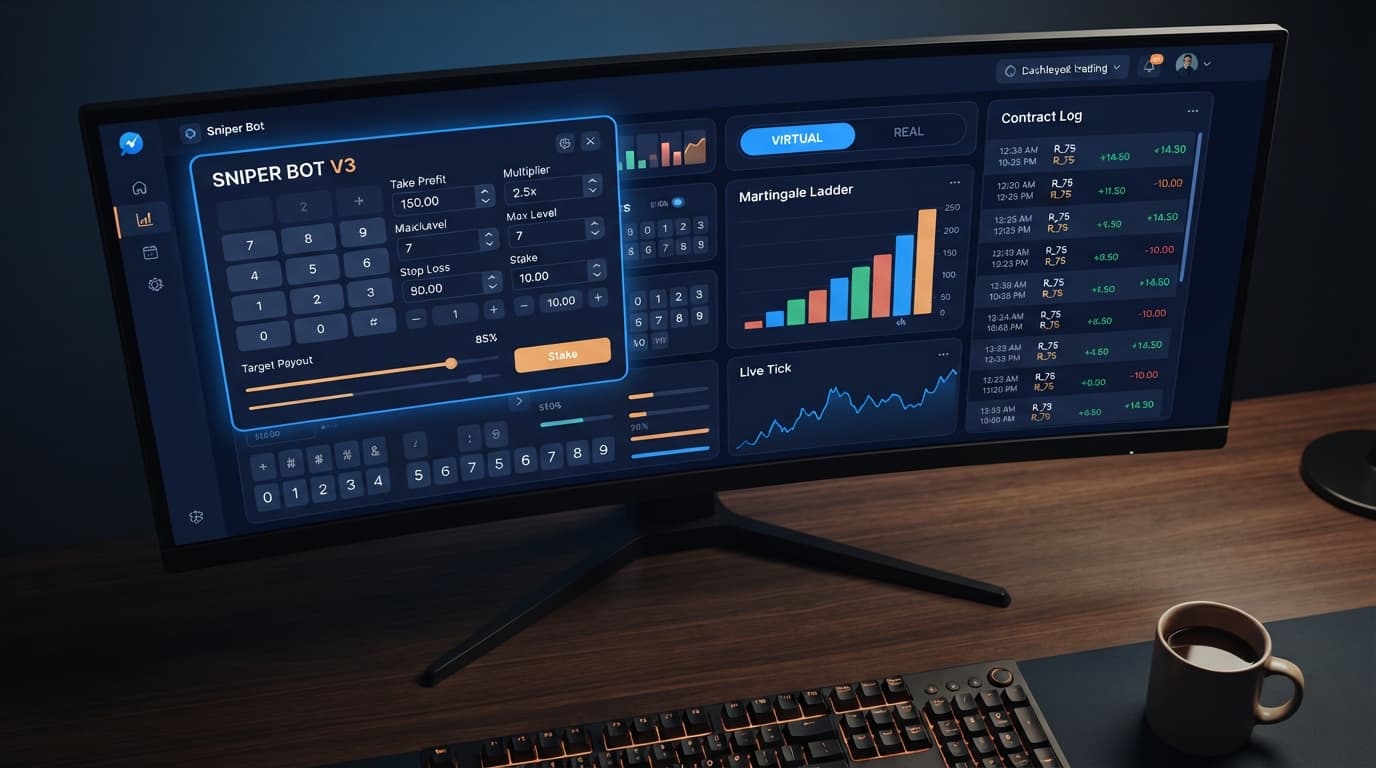
To configure your sniper bot v3 take profit settings, enter your desired monetary target directly into the TARGET PROFIT field on the control panel before launching your session. In Sniper Bot V3, this threshold tells the script exactly when to halt execution and lock in your session balance. Setting this boundary before taking a single contract keeps you from over-trading and giving back early gains to market noise.
When traders run automated tools without a defined profit exit, long sessions almost always end in giveback. The default or blank session target lets the bot run indefinitely, exposing your account to bad statistical runs that wipe out early wins. Setting your sniper bot v3 take profit settings properly aligns your profit targets with realistic market runs on synthetic assets.
Most traders discover the profit cap field only after watching a winning session reverse into a complete loss. When you launch a session on Deriv synthetic indices without defining an end point, you're placing your capital inside an open-ended probability loop. Automated scripts don't experience fatigue, but market conditions fluctuate, and long-term exposure favors the house edge inherent in contract payouts.
If you leave the session running to chase higher account balances, a single prolonged adverse run can hit your balance hard. Setting a clear goal inside your sniper bot v3 take profit settings ensures that once your target balance is met, the system drops its API connection and stops issuing purchase calls.
Using target caps keeps your execution windows short. Short execution windows limit your exposure to unexpected market shifts, especially when running aggressive stake progression modes like Martingale or Fibonacci on Volatility 75 or Volatility 100 indices.
| Setting Component | Default Behavior | Configured Behavior | Operational Advantage |
|---|---|---|---|
| Session Termination | Runs until manual stop or total loss | Halts immediately at TARGET PROFIT | Secures current balance without manual monitoring |
| Exposure Duration | Indefinite tick cycles | Restricted to specific profit goal | Reduces overall exposure to long loss streaks |
| Discipline Management | Dependent on manual trader action | Hardcoded within script parameters | Prevents emotional goalpost shifts during hot runs |
| Execution State | Continuous contract requests | Immediate WebSocket disconnect | Drops active session instantly upon target hit |
Setting your boundaries takes less than a minute. Follow these steps on the dashboard to lock in your profit target alongside your risk rules.
Open the panel and choose your contract structure under MODE. You can run CALL, PUT, DIGITEVEN, DIGITODD, DIGITDIFF, ONETOUCH, or NOTOUCH. After picking your market mode, navigate to the UNIT field and type your base contract stake, such as 1.00 USD. If you choose % OF BALANCE instead, enter the percentage you want each initial trade to risk relative to your current account equity.
Locate the TARGET PROFIT field on the dashboard. Type the total net gain in cash value that must trigger a session shutdown. For instance, if your starting account equity is 100 USD and you want a 5 USD session profit, type 5 in this box. Do not calculate this as total payout revenue; enter the actual net profit figure you expect to retain after accounting for contract costs.
Move down to the STOP LOSS field and specify the maximum drawdown you'll tolerate for the run. Enter this as a positive number representing your maximum allowed loss, such as 15. If your balance drops by 15 USD during the execution cycle, the bot halts immediately alongside your profit rules. Never run an automated session with a blank stop threshold.
Under VIRTUAL LOSS (in a row), set how many imaginary paper-trade losses must occur before the bot places a real stake. To control what happens after a live trade completes, set BACK TO VIRTUAL. Select IF REAL WIN if you want the system to fall back to paper trading immediately after reaching a live win, or IF REAL WIN/LOSE to return to virtual execution regardless of the live outcome. If you are testing paper execution, enter your virtual API string inside VIRTUAL TOKEN.
Set DELAY AFTER WIN and DELAY AFTER LOSE to insert short pause intervals (in seconds) between contract purchases. This prevents fast API spamming during choppy market ticks. Finally, check BOT STOP AFTER if you want the session to terminate after reaching a fixed number of total contracts or specific trade outcomes, independent of your target balance limits.
Traders running digit modes like DIGITEVEN, DIGITODD, or DIGITDIFF often look at short-term digit counts to decide when to set low, fast targets. While inspecting previous digit occurrences shows recent activity, it's essential to remember that Deriv synthetic indices rely on cryptographic random number generation. Past frequency describes recent outputs, but it never alters the mathematical odds of the next tick draw.
Here is a sample readout representing 500 recent ticks gathered on the Volatility 75 Index using an online digit counter:
| Last Digit | Recorded Ticks | Percentage Frequency | Status on Screen |
|---|---|---|---|
| 0 | 48 | 9.6% | Average |
| 1 | 52 | 10.4% | Average |
| 2 | 41 | 8.2% | Cold |
| 3 | 59 | 11.8% | Hot |
| 4 | 50 | 10.0% | Average |
| 5 | 46 | 9.2% | Average |
| 6 | 55 | 11.0% | Hot |
| 7 | 43 | 8.6% | Cold |
| 8 | 54 | 10.8% | Average |
| 9 | 52 | 10.4% | Average |
Looking at this distribution, digit 3 appeared most frequently at 11.8%, while digit 2 appeared cold at 8.2%. A trader looking at this chart on screen might decide to run a short session targeting a modest profit using DIGITDIFF against cold digits, expecting those values to stay rare.
However, every single tick remains an independent event with an exact 10% underlying probability. The statistical probability of digit 2 coming up on tick 501 is identical to digit 3. Because digit distributions mean-revert over thousands of ticks, relying on short-term hot or cold digits to sustain long trading sessions is risky. That's why setting tight targets inside your sniper bot v3 take profit settings is critical: you capture short-term statistical noise and disconnect before the broader distribution catches up with your balance.
When your active session reaches your TARGET PROFIT limit, the bot changes its execution behavior instantly. Here is what you will observe on your screen during live operation:
By forcing a complete shutdown, the system forces you to step away and analyze the current state of popular deriv bots before opting to trade again.
The most common mistake traders make with sniper bot v3 take profit settings is setting goals that require long session runs when using aggressive stake progression strategies. If your TARGET PROFIT requires 30 consecutive winning trades while running Martingale multiplier ladders, you leave your balance vulnerable to an extended losing streak that hits your account hard before you ever reach your goal. Keep targets modest relative to your base stake.
Another mistake involves misconfiguring secondary safety controls alongside your profit limits. Here are two specific settings people get wrong:
Setting MAX LEVEL Too High: Under stake management, MAX LEVEL caps the number of times the script can double or step up your stake after a loss. If you set MAX LEVEL to 8 with a 2x MULTIPLIER and a 1.00 USD base stake, your eighth step requires a 128.00 USD single-contract commitment. If your TARGET PROFIT was only set to 2.00 USD, you're risking 128.00 USD just to secure a 2.00 USD gain. Always align your progression cap with your intended profit objective.
Misinterpreting WHEN MAX LEVEL Actions: The WHEN MAX LEVEL control determines what the bot does when your stake ladder hits the capped level. Options include resetting back to base unit or stopping the session. Many traders leave this set to reset without realizing that resetting the stake ladder accepts the realized drawdown and starts building from scratch, making it much harder for the bot to reach your original TARGET PROFIT during that session.
Testing different rule combinations across automated setups takes time, so always calibrate your strategy controls thoroughly before launching live sessions. Many traders test their settings on binary bots using virtual funds to make sure their targets trigger as planned.
Try configuring your session limits on Sniper Bot V3 using a virtual balance first.
If you haven't connected your API token yet, create a free Deriv account to test the settings.
Trading involves risk. Past performance does not guarantee future results.
Advanced automated trading bot for Deriv with Rise/Fall, Higher/Lower, Touch/No Touch and Digit strategies, plus martingale, anti-martingale, Fibonacci and D'Alembert money management.
Open Sniper Bot V3 →You can configure this by entering your desired monetary target directly into the TARGET PROFIT field on the control panel before launching your session. This tells the script exactly when to halt execution and lock in your session balance.
Leaving the session target blank lets the bot run indefinitely, exposing your account to bad statistical runs that can wipe out early wins. Without a defined profit exit, long sessions almost always end in giveback.
The system drops its API connection and stops issuing purchase calls immediately once your target balance is met. This automated shutdown secures your current balance without requiring manual monitoring.
You simply locate the TARGET PROFIT field on the dashboard and type the total net gain in cash value that should trigger a session shutdown. For example, if you want a 5 USD session profit, you just type 5 into that box.
Guides closest to this one.
Master your sniper bot v3 api token setup for binary bots. Learn how to connect Deriv safely and launch your automated trading bot today.
Master the sniper bot v3 stop loss setup for Deriv bots. Learn to configure risk limits and target profit safely on our free automated trading bot.
Sniper Bot V3 demo account setup: paste a virtual token into VIRTUAL TOKEN, set STOP LOSS and TARGET PROFIT, and see what 5 martingale losses do to $100.