Auto Trading Bots
Solid Trading Bot Review: Digit Differs Strategy
Read this solid trading bot review for BinaryBot.live. Learn how to configure the digit differs automated trading bot safely. Try our free deriv bot today.
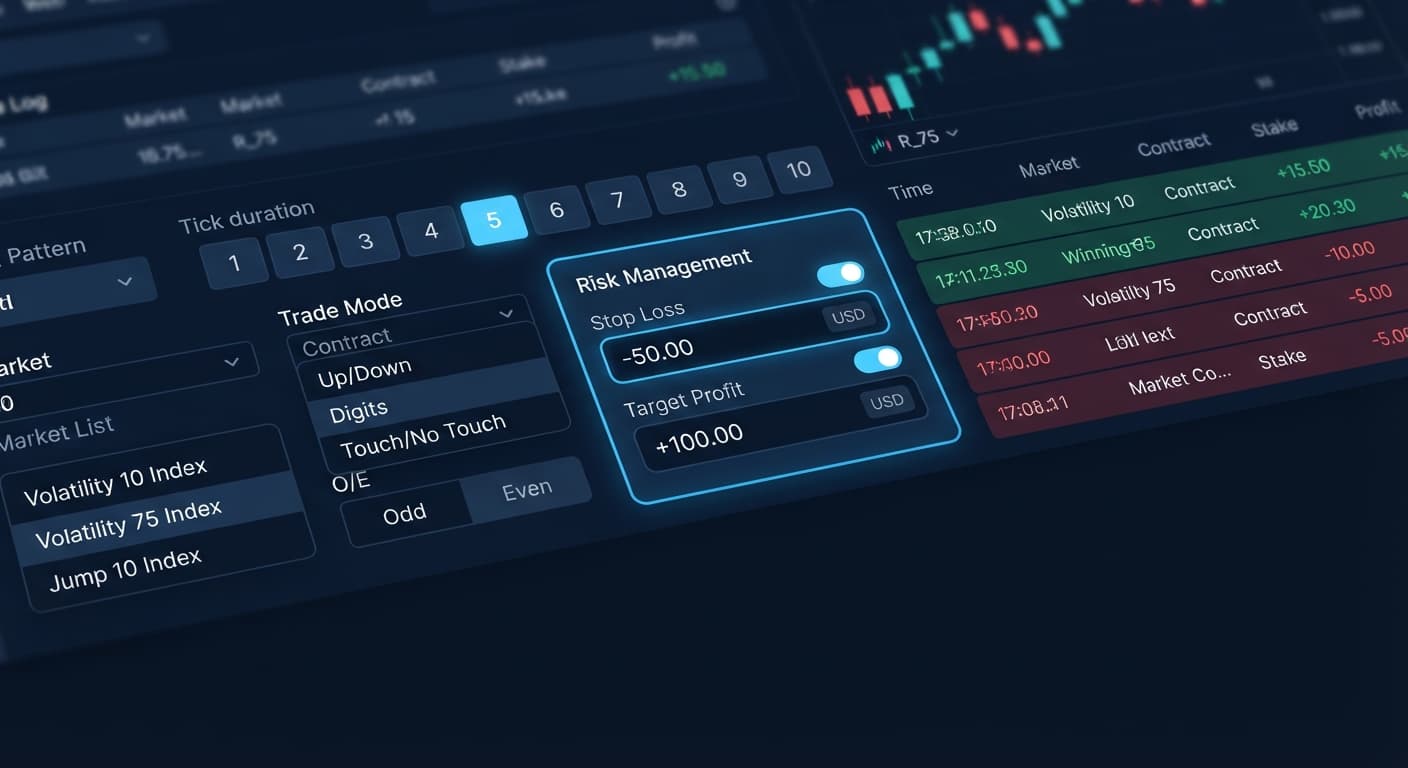
Configuring a proper solid trading bot stop loss setup requires defining explicit numeric dollar caps in two specific fields before hitting start: Stop Loss ($) and Target Profit ($). When your cumulative net loss reaches the exact dollar threshold entered in Stop Loss ($), the bot immediately terminates all trade executions and halts contract purchases. Setting your Stop Loss ($) at 15% to 20% of your session account balance prevents unexpected market runs from draining your capital while automated rules execute.
When you trade automated digit contracts on Deriv, manual intervention is usually too slow. Volatility index ticks move every single second. If you get caught on the wrong side of an execution run without an active limit, a small draw down turns into an empty account fast. That's why setting these numeric guardrails inside Solid Trading Bot isn't an optional safety feature—it's the foundation of automated execution.
Many traders using deriv bots assume that a pattern filter will shield them from consecutive losses. It won't. Synthetic index ticks on Deriv are completely independent random draws. A streak of five even digits doesn't raise the mathematical probability of an odd digit on the next tick. Because past outcomes don't change future odds, your stop loss remains your only absolute defense against a statistical outlier run.
The main controls on the interface put risk management inputs right alongside your entry logic. When you open the platform, the tool connects directly to Deriv over their official API using your personal token. No funds ever touch an intermediate server. The contract execution happens directly on your own Deriv account, whether you run a virtual demo balance or a live cash profile.
To lock in your parameters, locate the main parameters form on the screen. You'll see seven specific control inputs:
OEO or EEEE to delay entry until that sequence prints.When finalizing your solid trading bot stop loss setup, locate Stop Loss ($) and Target Profit ($) at the bottom of the input stack. Entering numbers here instructs the bot engine to track session net profit after every closed contract. If your balance dips by your designated dollar threshold, the script stops sending contract orders over the API instantly.
A major mistake traders make with binary bots is setting a tight Target Profit ($) alongside a massive Stop Loss ($). If you aim to make $5 but risk $100, a single bad run wipes out weeks of small session wins. Conversely, setting a Stop Loss ($) too close to your Start Stake ($) means normal tick variance triggers a shutdown before your strategy gives statistical probabilities room to play out.
You need to align your stake size, stop loss, and target profit based on your session bankroll and chosen trade mode. For high-probability modes like Digit Differs (placing DIGITDIFF contracts), your win rate per contract is high, but a single loss wipes out roughly ten winning stakes. For binary modes like Digit EVEN or Digit ODD, your payout sits close to 1:1, requiring a completely different capital balance.
| Strategy Profile | Bankroll Context | Start Stake ($) | Stop Loss ($) | Target Profit ($) | Max Loss Tolerance | Suitable Contract Types |
|---|---|---|---|---|---|---|
| Conservative Guard | $100 Bankroll | $1.00 | $15.00 | $10.00 | 15 Consecutive Losses (1:1 Payout) | DIGITEVEN, DIGITODD |
| Balanced Session | $250 Bankroll | $2.50 | $35.00 | $25.00 | 14 Consecutive Losses (1:1 Payout) | CALL, PUT |
| Digit Differs Safety | $200 Bankroll | $10.00 | $20.00 | $10.00 | 2 Consecutive Losses (9:1 Payout) | DIGITDIFF |
| Asymmetric Growth | $500 Bankroll | $5.00 | $100.00 | $50.00 | 20 Consecutive Losses (1:1 Payout) | DIGITOVER, DIGITUNDER |
Notice how the stop loss values scale directly with contract mechanics. If you're trading DIGITDIFF contracts, your payout is tiny per trade, but your loss is full stake. A two-loss stop loss stops an outlier streak from gutting your profile.
Follow these five steps to configure your parameters cleanly before launching automated runs.
Open the application and paste your API key to authenticate. Choose your asset from the Market Index menu. You can pick standard continuous assets like Volatility 75 Index or Volatility 100 (1s) Index, or pick Jump indices like Jump 50 Index.
Select your entry strategy under Trade Mode. If you choose Digit EVEN, you can filter executions using the Pattern (O=Odd, E=Even) field. Entering OOO tells the bot to wait until three consecutive odd digits print on the feed before placing a DIGITEVEN contract.
Set Tick Duration — 1 to 10 ticks to your target speed. For digit contracts, 1 tick provides instant execution, while 5 ticks smooth out brief micro-spikes. In the Start Stake ($) field, type your base dollar allocation—for example, $2.00.
To finish your solid trading bot stop loss setup, enter explicit dollar numbers in both threshold fields. For a $100 balance with a $2 base stake, enter 20 in Stop Loss ($) and 10 in Target Profit ($). Do not leave these blank. Do not use negative symbols; enter positive numbers representing dollar caps.
Before placing real funds on the line, switch your token to a Deriv demo balance. Click start and let the bot run through multiple executions until either target profit or stop loss triggers. Confirm that the bot halts automatically when the cumulative loss reaches your exact dollar cap.
To prove how specific control combinations alter automated trading execution, review this settings matrix across different markets and trade modes.
| Market Index | Trade Mode | Pattern (O=Odd, E=Even) | Tick Duration — 1 to 10 ticks | Start Stake ($) | Stop Loss ($) / Target Profit ($) | Execution Outcome & Target Trader Profile |
|---|---|---|---|---|---|---|
| Volatility 10 Index | Digit Differs | None | 1 tick | $10.00 | $20.00 / $5.00 | Rapid micro-wins; stops instantly on 2 losses. Suits low-greed scalpers. |
| Volatility 75 (1s) Index | Digit EVEN | OOO | 1 tick | $2.00 | $16.00 / $10.00 | Waits for 3 odd ticks before buying EVEN. Suits patient pattern traders. |
| Jump 25 Index | Only Rise | None | 5 ticks | $5.00 | $25.00 / $25.00 | Places CALL contracts on Jump spikes with 5-tick duration. Suits trend followers. |
| Volatility 100 Index | Digit Over | EEE | 2 ticks | $1.00 | $15.00 / $10.00 | Places DIGITOVER contracts following an even run. Suits low-stake volume testers. |
| Jump 100 Index | Digit ODD | EEEE | 1 tick | $3.00 | $30.00 / $15.00 | Enters DIGITODD after 4 consecutive even ticks. Suits high-volatility digit tracking. |
If I had to run one single profile on a live account today, I would pick the Volatility 75 (1s) Index with Digit EVEN and an OOO pattern filter. The 1-second tick speed ensures frequent setups, while the 8-loss Stop Loss ($) threshold ($16 stop against a $2 stake) gives normal statistical variance enough room to recover without putting the balance at risk.
Test your setup on Solid Trading Bot using a virtual account before risking live funds.
If you haven't configured your profile yet, open a free Deriv account to generate your API token.
Trading involves risk. Past performance does not guarantee future results.
Advanced automated digit trading bot for Deriv with 9 trading strategies including Digit Differs, Odd/Even, Over/Under, Rise/Fall and Higher/Lower.
Open Solid Trading Bot →You can set a stop loss by entering an explicit numeric dollar cap into the Stop Loss ($) field on the Solid Trading Bot control deck before you start trading. When your cumulative net loss hits that exact dollar threshold, the bot instantly halts all contract purchases and terminates trade executions.
Setting your Stop Loss ($) at 15% to 20% of your session account balance helps prevent unexpected market runs from draining your capital. You'll want to avoid setting it too close to your start stake, otherwise normal tick variance will trigger a shutdown before your strategy can play out.
No, pattern filters won't shield you from a streak of losses because synthetic index ticks on Deriv are independent random draws where past outcomes don't change future odds. Because of this statistical reality, your stop loss acts as your only absolute defense against a bad execution run.
You'll find the Stop Loss ($) input right at the bottom of the main parameters form on the Solid Trading Bot interface, located alongside your target profit and entry logic controls. It connects directly to your Deriv account over the official API to track your session net profit after every closed contract.
Guides closest to this one.
Read this solid trading bot review for BinaryBot.live. Learn how to configure the digit differs automated trading bot safely. Try our free deriv bot today.
Compare solid trading bot vs manual trading for Deriv digit strategies. Discover how an automated trading bot executes binary options faster on BinaryBot.live.
Master solid trading bot settings on BinaryBot.live. Learn to configure your automated trading bot step by step for safer Deriv bot trading strategy execution.